
How Does a Multifunction Office Printer Connect Paper and Digital Workflows?
Modern businesses depend on technology to keep employees productive, customers informed, and daily operations moving. A Multifunction Office Printer can do far more than simply print documents when it is properly integrated into an organization’s workflow. Printing, scanning, copying, document storage, networking, cybersecurity, and employee technology support all contribute to how efficiently an office operates. When these areas are managed as connected parts of the workplace, businesses can reduce unnecessary interruptions, improve document workflows, and create a more organized technology environment.
Stargel Office Solutions provides business technology solutions designed to support these needs. Its offerings include office equipment, managed print services, document management, managed IT services, network management, cybersecurity, cloud solutions, backup and data protection, production printing, and digital signage. By bringing multiple technology needs together, businesses can develop an office environment that supports productivity while adapting to changing operational requirements.
Why Office Technology Matters for Business Productivity
Technology is involved in nearly every modern business process. Employees create documents, communicate digitally, access cloud applications, print contracts, scan records, share information, and depend on reliable networks throughout the workday. When one part of this environment becomes inefficient, the impact can extend beyond a single device or employee.
A slow printer can delay an important document. Poorly organized files can make information difficult to locate. Network connectivity problems can interrupt employee workflows, while outdated systems can create additional maintenance and security concerns.
Common Office Technology Challenges
Businesses may encounter several recurring challenges:
- Inefficient printers, copiers, and scanners
- Uncontrolled or unnecessary printing
- Difficulty monitoring device usage and supplies
- Repetitive manual document processes
- Files that are difficult to locate or retrieve
- Network and connectivity interruptions
- Employee downtime caused by technology issues
- Increasing cybersecurity concerns
- Difficulty maintaining and updating business technology
Addressing every issue separately can result in disconnected solutions. A more coordinated approach considers how office equipment, documents, software, networks, and employees interact.
Creating a More Efficient Printing Environment
Printing continues to play an important role in many businesses. Contracts, invoices, reports, presentations, forms, marketing materials, and other records may still need to be printed, copied, or scanned.
The objective is not necessarily to eliminate printing. Instead, organizations can focus on making their printing environment more efficient and easier to manage.
Choosing equipment based on actual business requirements is an important starting point. Different departments may have different printing volumes, scanning requirements, security needs, and workflow expectations. Selecting a device based only on its initial price may overlook ongoing costs associated with toner, maintenance, service, energy consumption, and employee productivity.
Stargel Office Solutions provides printers, copiers, scanners, and multifunction systems designed to support different business environments. Its production printing solutions can also support organizations with higher-volume or specialized printing requirements.
Connecting Printing With Digital Workflows
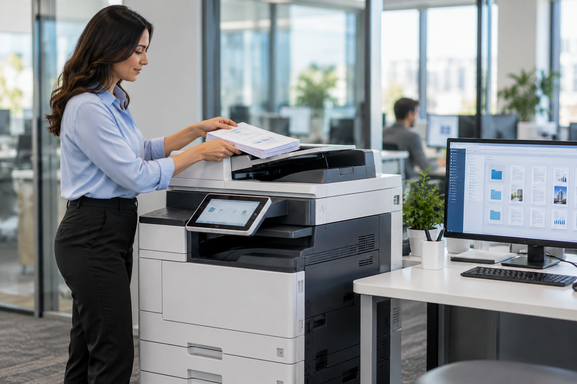
Modern multifunction equipment can act as a bridge between paper-based and digital processes. Employees can scan physical documents, distribute information electronically, and incorporate documents into digital workflows rather than relying entirely on manual filing.
This becomes particularly useful when printing and scanning are connected with document management technology. Instead of printing a document, manually filing it, and later searching through physical folders, businesses can establish more organized processes for capturing, storing, and retrieving information.
How Managed Print Can Improve Visibility and Control
Printing expenses can be difficult to track because they are often distributed across multiple departments, devices, supplies, service requirements, and purchasing activities. Without visibility into the print environment, decision-makers may not have a complete understanding of what printing actually costs the organization.
This is where Managed Print Services can provide a structured approach to managing business printing. A managed print strategy can assess an organization’s existing equipment and workflows, identify opportunities for improvement, and help align printing resources with actual business requirements.
What a Managed Print Strategy Can Address
Depending on an organization’s needs, a managed approach can help with:
- Evaluating existing printers and multifunction devices
- Understanding device utilization and print volumes
- Identifying unnecessary or inefficient printing
- Managing toner and other consumables
- Supporting device maintenance
- Keeping printer software and drivers updated
- Improving equipment utilization
- Creating greater visibility into printing costs
Stargel’s managed print solutions are designed around assessment, monitoring, optimization, and ongoing support. The company also provides toner management capabilities intended to help businesses maintain necessary supplies and reduce avoidable interruptions.
The value of managed print extends beyond reducing the number of pages printed. Better visibility can help organizations understand how equipment is being used and make more informed decisions about future technology investments.
Improving Document Management and Information Access
Documents are essential to almost every organization. Contracts, invoices, customer records, employee information, project files, correspondence, and operational documents all need to be stored and accessed appropriately.
Traditional paper filing can make information retrieval time-consuming. Employees may spend valuable time searching through cabinets, folders, or individual storage locations. Digital document management provides an opportunity to create more structured information workflows.
Stargel offers document management solutions that help businesses organize paper and electronic information. Digital workflows can support document capture, storage, retrieval, sharing, and controlled access while reducing dependence on manual processes.
Making Documents Easier to Find and Use
A well-designed document workflow can help employees spend less time searching for information and more time completing productive work.
For example, a paper document can be scanned into a digital workflow, categorized, stored, and made available to authorized employees. Instead of repeatedly handling the same physical document, employees can access the appropriate digital version when needed.
For organizations that process significant amounts of information, these improvements can make everyday operations more organized and consistent.
Supporting the Technology Behind the Office
Office productivity depends on much more than printers and document systems. Employees also rely on computers, networks, cloud applications, security tools, data protection systems, and other technology throughout the day.
When technology problems occur, even a relatively small issue can interrupt an employee’s ability to work. Hardware problems, connectivity issues, software problems, outdated systems, and security concerns may require technical expertise to resolve.
Stargel provides managed IT services and technology support designed to help businesses manage their IT environments. Its broader technology solutions include network management, cybersecurity, cloud solutions, backup and data protection, and IT support.
Building a Connected Technology Environment
The greatest opportunity often comes from viewing office technology as a connected environment rather than a collection of unrelated products.
A business may use multifunction equipment to capture documents, document management software to organize information, cloud solutions to provide accessibility, and IT services to support the infrastructure behind these systems.
When these components are planned together, businesses can create workflows that are easier to manage and better aligned with everyday operations.
Choosing the Right Office Technology Partner
Technology decisions should consider more than equipment specifications or initial purchase prices. Businesses should also consider implementation, maintenance, service, security, scalability, employee requirements, and long-term operating costs.
An experienced technology provider can help organizations evaluate their current environment, identify areas that may be creating inefficiencies, and determine which solutions are appropriate for their needs.
Stargel Office Solutions offers a range of business technology services, including office equipment, managed print, document management, managed IT, network management, cybersecurity, cloud solutions, backup and data protection, production printing, and digital signage.
A More Strategic Approach to Office Technology
Businesses do not have to treat printing, document management, and IT as completely separate areas. These technologies increasingly work together as part of the same workplace environment.
A coordinated strategy can help organizations improve information accessibility, manage technology more effectively, reduce unnecessary interruptions, and give employees better tools for completing their work.
For businesses looking to strengthen the technology infrastructure behind their daily operations, Managed IT Support Services can complement office equipment, document management, network technology, cybersecurity, and other business technology investments. A connected approach allows organizations to focus not only on individual devices but also on how technology supports the entire workplace.
Frequently Asked Questions
What is a multifunction office printer?
A multifunction office printer combines several functions into one device, commonly including printing, copying, scanning, and sometimes faxing or advanced document-processing capabilities. Businesses can select multifunction equipment based on their print volume, workflow requirements, scanning needs, and office environment.
How can managed print services help a business?
Managed print services can help businesses gain greater visibility into their printing environment, manage equipment and supplies, monitor usage, and identify opportunities to improve printing efficiency. The specific benefits depend on the organization’s current equipment, workflows, print volume, and management requirements.
Why is document management important for businesses?
Document management helps organizations organize, store, retrieve, and share business information more efficiently. Digital document workflows can reduce reliance on physical filing and make important information easier for authorized employees to locate and access.
Can printing and document management work together?
Yes. Modern multifunction devices can scan physical documents into digital workflows, allowing organizations to connect printing and scanning activities with document storage and management processes. This can help reduce manual handling and create more consistent information workflows.
What do managed IT services typically support?
Managed IT services can support areas such as business networks, computers, cloud technologies, cybersecurity, data protection, technical support, system maintenance, and other components of an organization’s technology environment. The services provided depend on the business’s requirements and technology infrastructure.
How should a business choose office technology?
Businesses should consider their current workflows, printing volume, document requirements, employee needs, security considerations, network environment, ongoing maintenance, scalability, and total operating costs. A technology assessment can help identify solutions that align with actual business requirements rather than relying only on equipment specifications.
Why work with a technology solutions provider?
Working with a technology solutions provider can give businesses access to multiple services through one technology partner. Instead of managing office equipment, printing, documents, IT infrastructure, and related technology independently, organizations can develop a more coordinated approach based on their operational needs.